Poster Sizes: 11x17, 18x24, 24x36, Bleed and Pixels
Tomas Amaya
September 16, 2026Updated September 18, 202611 min read
What Are the Standard Poster Sizes?
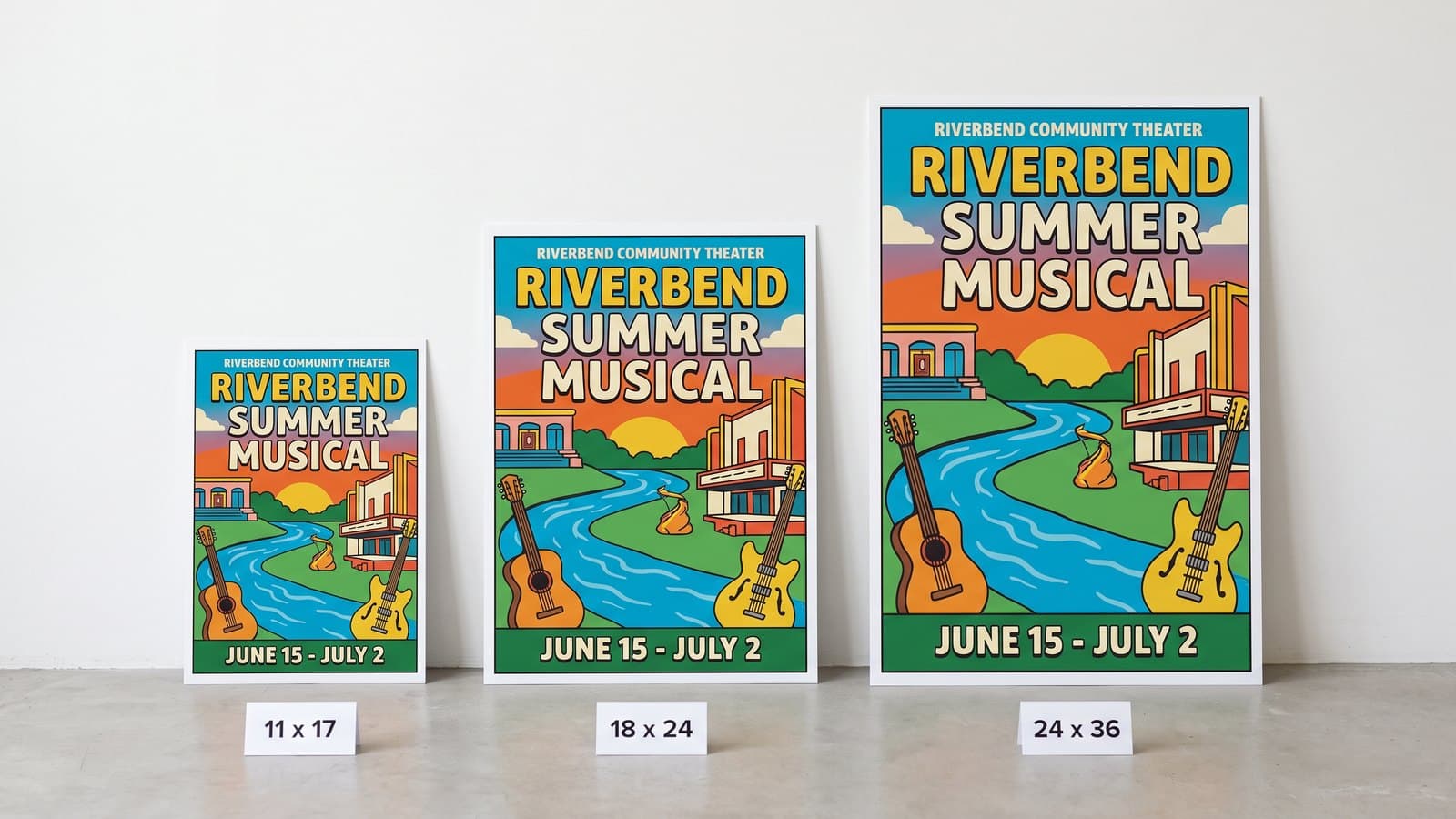
Standard poster sizes in the United States are 11 x 17, 18 x 24 and 24 x 36 inches. An 18 x 24 poster is 5400 x 7200 pixels at 300 dpi, and a 24 x 36 is 7200 x 10800. Add 0.125 inch of bleed on all four sides and hold text 0.25 inch inside the trim.
Those three sizes stayed standard because frames, snap frames, easels and window wells are cut for them. Everything else on the chart below fills a gap between them. Trim is the finished poster, the size you order. Bleed is the larger file you send us. The safe zone is the box your words are allowed to live in.
Landscape sizes are the same numbers turned sideways. A 17 x 11 is an 11 x 17 rotated, and nothing changes but which dimension you type first. That matters on our ladder, because our small posters run 17 x 11 rather than 11 x 17: same sheet, same price, hung the other way.
| Poster size (trim) | Millimeters | Centimeters | Pixels at 300 dpi | Pixels at 150 dpi | Bleed file (inches) |
|---|---|---|---|---|---|
| 11 x 17 in | 279 x 432 | 27.9 x 43.2 | 3300 x 5100 | 1650 x 2550 | 11.25 x 17.25 |
| 12 x 18 in | 305 x 457 | 30.5 x 45.7 | 3600 x 5400 | 1800 x 2700 | 12.25 x 18.25 |
| 16 x 20 in | 406 x 508 | 40.6 x 50.8 | 4800 x 6000 | 2400 x 3000 | 16.25 x 20.25 |
| 18 x 24 in | 457 x 610 | 45.7 x 61 | 5400 x 7200 | 2700 x 3600 | 18.25 x 24.25 |
| 22 x 28 in | 559 x 711 | 55.9 x 71.1 | 6600 x 8400 | 3300 x 4200 | 22.25 x 28.25 |
| 24 x 36 in | 610 x 914 | 61 x 91.4 | 7200 x 10800 | 3600 x 5400 | 24.25 x 36.25 |
| 27 x 40 in | 686 x 1016 | 68.6 x 101.6 | 8100 x 12000 | 4050 x 6000 | 27.25 x 40.25 |
| 36 x 48 in | 914 x 1219 | 91.4 x 121.9 | 10800 x 14400 | 5400 x 7200 | 36.25 x 48.25 |
How Many Pixels Is a Poster at 300 dpi?
An 18 x 24 poster is 5400 x 7200 pixels at 300 dpi, and a 24 x 36 is 7200 x 10800 pixels. Pixels mean nothing until a resolution is attached to them, so multiply each dimension in inches by the dots per inch you are building at and you have the canvas.
The second column matters more than most people expect. Three hundred dpi is the number for anything read in a hand, and 150 dpi is normal for a large poster, because nobody stands three inches from a 24 x 36 sheet. At 150 dpi that same poster is 3600 x 5400 pixels, a file every design program is happy to open, and at normal viewing distance the two are indistinguishable. A 36 x 48 at full 300 dpi would be 10800 x 14400 pixels, which is a file that fights you for no gain.
One trap sits underneath all of this: the canvas being right does not make the photographs in it right. A 1200 pixel image stretched across an 18 inch poster prints at roughly 66 dpi whatever the document says. Check every placed image at final size, and keep logos and headline type in vector, because vector has no resolution to run out of.
What Is Bleed on a Poster?
Bleed is the 0.125 inch band of artwork that runs past the trim line and gets cut away, which is 3 mm on all four sides. It exists because paper and blades both move a little, never by nothing.
Picture a poster with a deep teal background. If the file stops exactly at 18 x 24 and the cut lands a hundredth of an inch inside the line, you get a white hairline down one edge. Push the teal out to 18.25 x 24.25 and the same shift cuts teal instead of paper, and nobody can tell the blade moved.
Big sheets make this worse, not better. The longer the cut, the more room a fraction of an inch of drift has to show up as a wedge rather than a line. Bleed is not a design decision, it is insurance.
Design Guidelines for Poster Artwork
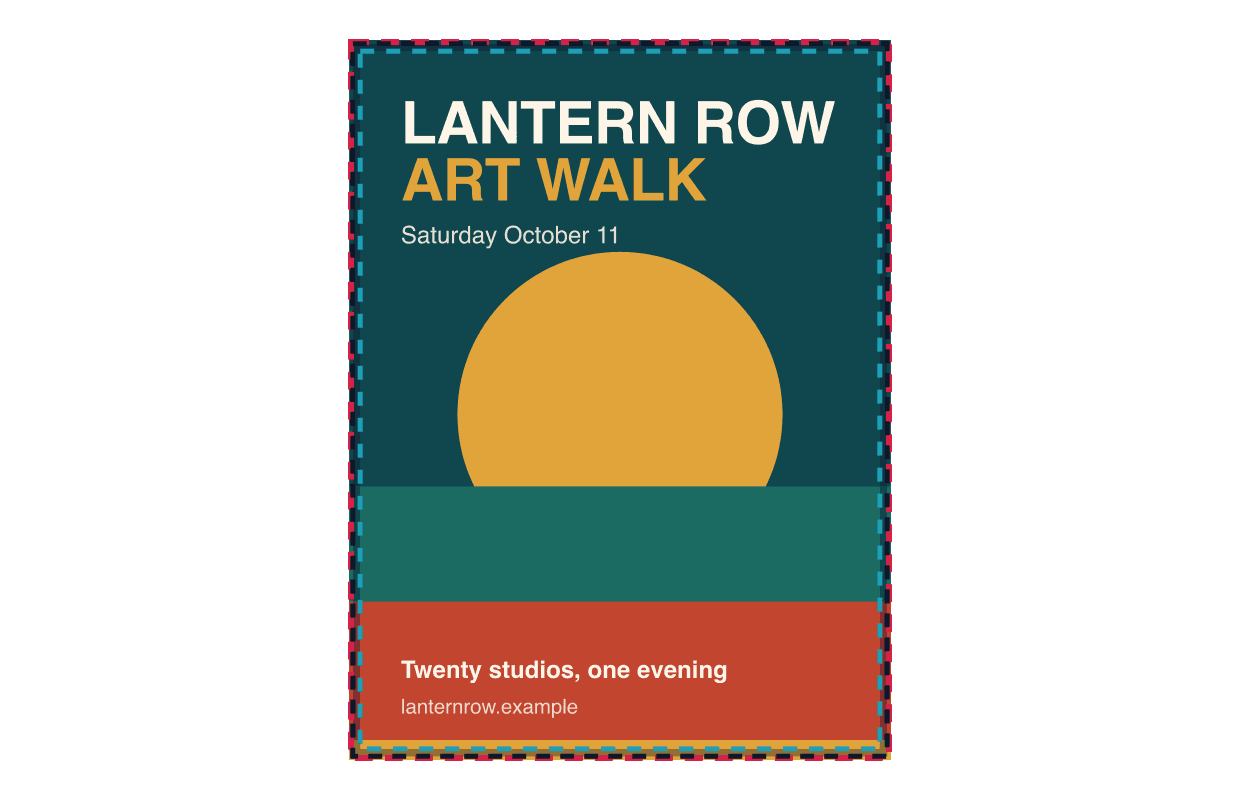
You can upload your own artwork or we can build it for you. Either way the file has to respect three lines, and this is what each one is for.
- Bleed area
- 18.25 x 24.25 in
- Trim line (actual size)
- 18 x 24 in
- Safe printing area
- 17.5 x 23.5 in
Bleed area: 18.25 x 24.25 in If your poster has a background color, a photo or a bar of brand color along an edge, it has to extend past the trim on all four sides. That extra 0.125 inch is what gets cut away, and it is the only reason your poster comes back without a white sliver on one edge.
Actual size: 18 x 24 in This is where the blade lands and what goes on the wall. It is the number every snap frame, easel and standard poster frame in the United States is built around, and it is the one figure on this page that never changes.
Safe printing area: 17.5 x 23.5 in Everything that has to survive the cut lives inside this box: your headline, your dates, your logo, your QR code. Hold text 0.25 inch in from the trim on every side. On a poster that costs you almost nothing, because the margin is one percent of the height.
Poster size in pixels: 5400 x 7200 pixels If you or your designer work in pixels, that is an 18 x 24 at 300 dpi. The full bleed file is 5475 x 7275 pixels and the safe area is 5250 x 7050 pixels. These are the industry standard numbers, so a file built to them prints correctly at any printer, not just at ours.
Which Poster Size Should I Use?
11 x 17 and 12 x 18 are close read sizes. They work where somebody is already standing still: a counter, a corkboard, a break room, a window people pass within a few feet of. They are also the cheapest way to test a design.
16 x 20 and 18 x 24 are the workhorses. An 18 x 24 is large enough to stop somebody crossing a parking lot and small enough to fit a standard easel, a window, or a hallway between doors. If you are not sure, start here.
22 x 28 and 24 x 36 are room scale. Use them when the poster has to win against competing signage or be read from across a gym, a sanctuary or a show floor. At this size a headline of five or six words carries the whole piece.
27 x 40 and 36 x 48 are the wall pieces. The one sheet is the theatrical size, and 36 x 48 is as large as paper stays practical. What to print alongside them is its own decision, and we walked through it in how to choose marketing materials for any event.
How Big Do the Letters Need to Be on a Poster?
Allow about one inch of capital letter height for every ten feet of viewing distance. A headline meant to be read from 30 feet needs letters roughly 3 inches tall, which is about an eighth of an 18 x 24 poster's height.
Run that math before you design, not after. If your headline needs 4 inch letters and six words, an 11 x 17 was never going to work. Body copy is the opposite problem: anything under about 24 point on a poster is decoration, because nobody stands close enough to read it. Put the detail on a handout and let the poster carry the headline. The contrast and hierarchy rules behind that are collected in our graphic guidelines for banner design.
What Size Is a Movie Poster?
The theatrical one sheet is 27 x 40 inches, or 686 x 1016 mm. That is the size studios ship to theaters, the size lobby cases and backlit frames are cut for, and the size most collectors mean when they say movie poster.
Two variations come up. Older one sheets ran 27 x 41 inches, so a vintage poster sits a little tall in a modern frame. Promotional versions handed out at screenings are usually 11 x 17.
What Poster Sizes Do We Print, and What Do They Cost?
Our posters print on 16pt gloss stock in full color, with 48 hour production once your artwork is approved. The standard stock runs 12 x 18, 14 x 11, 16 x 12 and 17 x 11, priced at $74.89 for 10, $106.99 for 25, $160.49 for 50, $246.09 for 100 and $545.69 for 250. The oversized stock runs 18 x 28 and 20 x 16, printed one per sheet, at $96.29 for 10, $160.49 for 25, $246.09 for 50, $427.99 for 100 and $1,005.79 for 250.
Going larger has its own page. Large format posters print on satin photo poster paper at 18 x 24, 24 x 36, 27 x 40 and 36 x 48, with no minimum pack, so a single poster is a real order: $32.09 for one 18 x 24, $64.19 for one 24 x 36, $74.89 for one 27 x 40 and $117.69 for one 36 x 48. Ten of the same sizes are $181.89, $353.09, $427.99 and $684.79.
Wanting rigid instead of paper is a different product. A foam board sign is the usual answer for a poster that has to stand on an easel for a month without curling, and anything outside both size lists runs through custom orders. Past 36 x 48 a vinyl banner costs less per square foot than paper does. Everything is printed in the USA, every order includes a free digital proof, and shipping is a flat $10 ground to any US address.
Mistakes We Catch on Poster Proofs
Four things account for nearly every poster file we send back, and all four are size problems wearing a different hat.
A file built at trim size with no bleed. This is the most common hold we place on a poster. We can usually extend a flat background color out for you, but we cannot invent the missing edge of a photograph, and on a 24 x 36 there is a lot of edge to invent. Build at the bleed size from the start and this never comes up.
A headline sized for a screen instead of a wall. A poster looks balanced at 25 percent zoom on a laptop and then goes up in a lobby where the nearest reader is 25 feet away. We measure the cap height on the proof and say something when it does not match the room, because that call is cheaper before the ink goes down.
A photo that is right for the web and wrong for the wall. The document says 300 dpi, the photograph dropped into it says 66, and the document wins that argument only on paper.
Text sitting on the trim line. A date or a website that ends an eighth of an inch from the edge reads fine on screen and gets shaved on a real stack. Posters are cut many at a time, so hold everything you care about a quarter inch in.
What to Send Us
A print ready PDF at the bleed size, CMYK, 300 dpi for anything up to 18 x 24 and at least 150 dpi at full size above that, fonts outlined or embedded, and all text inside the safe zone. That file goes straight to press. The short version:
- Document size set to the bleed dimensions, not the trim dimensions
- CMYK, with every placed photo checked at final size
- Text and logos held 0.25 inch inside the trim
- Backgrounds and color blocks running all the way to the bleed edge
- Fonts outlined or embedded, exported as a print ready PDF
There is no setup fee. Upload any image or file and we make it print ready: size, bleed, resolution and color. If you have no design at all, Design it for me is +$32.10 on an item under $499 and free at $499 or more, which includes the 250 packs at $545.69 and $1,005.79, and a designer builds the poster from scratch with two revisions included.
Our Poster Size Visual Guide
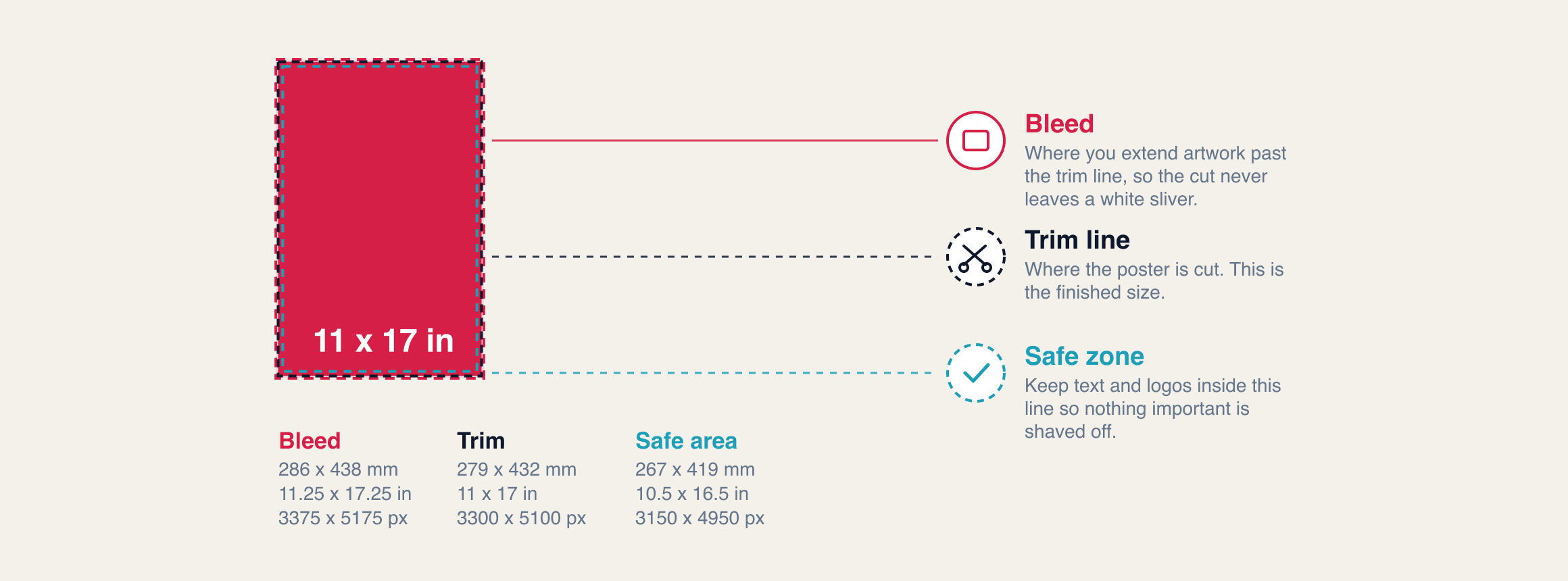
Four sizes, the same three lines on each, with every number in millimeters, inches and pixels at 300 dpi. Swipe through them and build to the one you need. The small version of the same message is covered in postcard sizes, the rigid curb version in yard sign sizes, and the pocket version in standard business card size.
11 x 17
- Bleed
- 286 x 438 mm
- 11.25 x 17.25 in
- 3375 x 5175 px at 300 dpi
- Trim
- 279 x 432 mm
- 11 x 17 in
- 3300 x 5100 px at 300 dpi
- Safe area
- 267 x 419 mm
- 10.5 x 16.5 in
- 3150 x 4950 px at 300 dpi
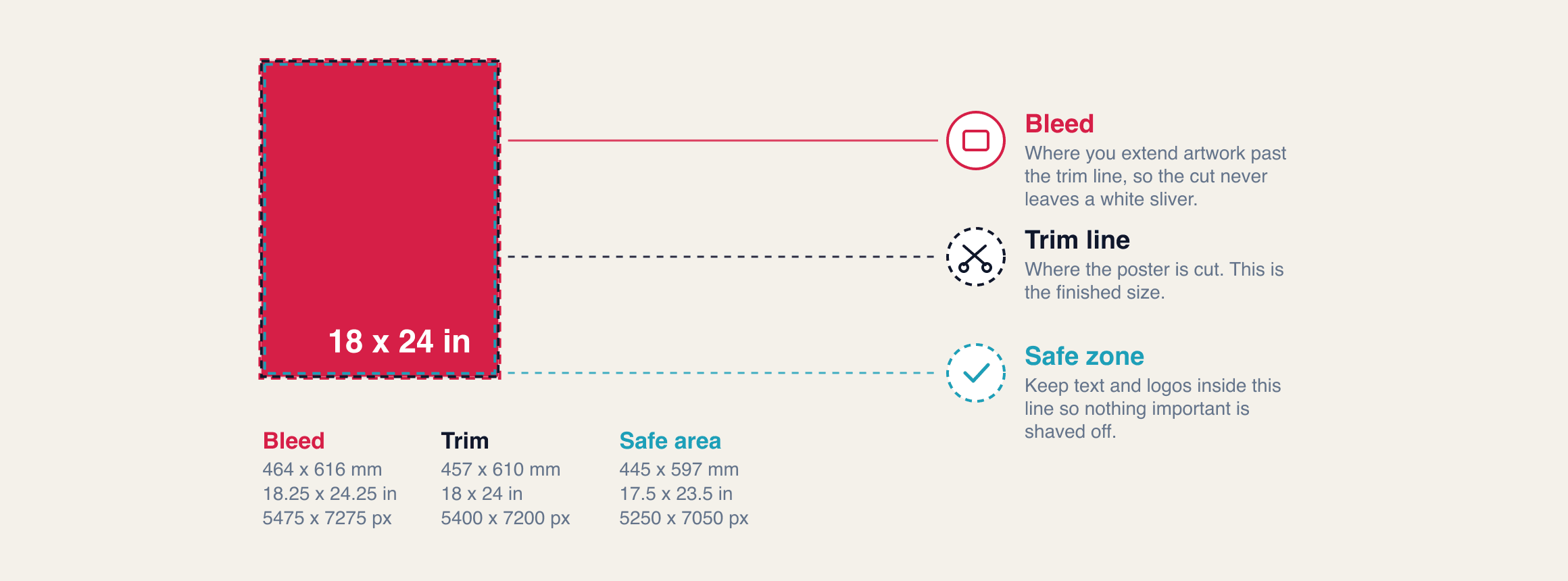
18 x 24
- Bleed
- 464 x 616 mm
- 18.25 x 24.25 in
- 5475 x 7275 px at 300 dpi
- Trim
- 457 x 610 mm
- 18 x 24 in
- 5400 x 7200 px at 300 dpi
- Safe area
- 445 x 597 mm
- 17.5 x 23.5 in
- 5250 x 7050 px at 300 dpi
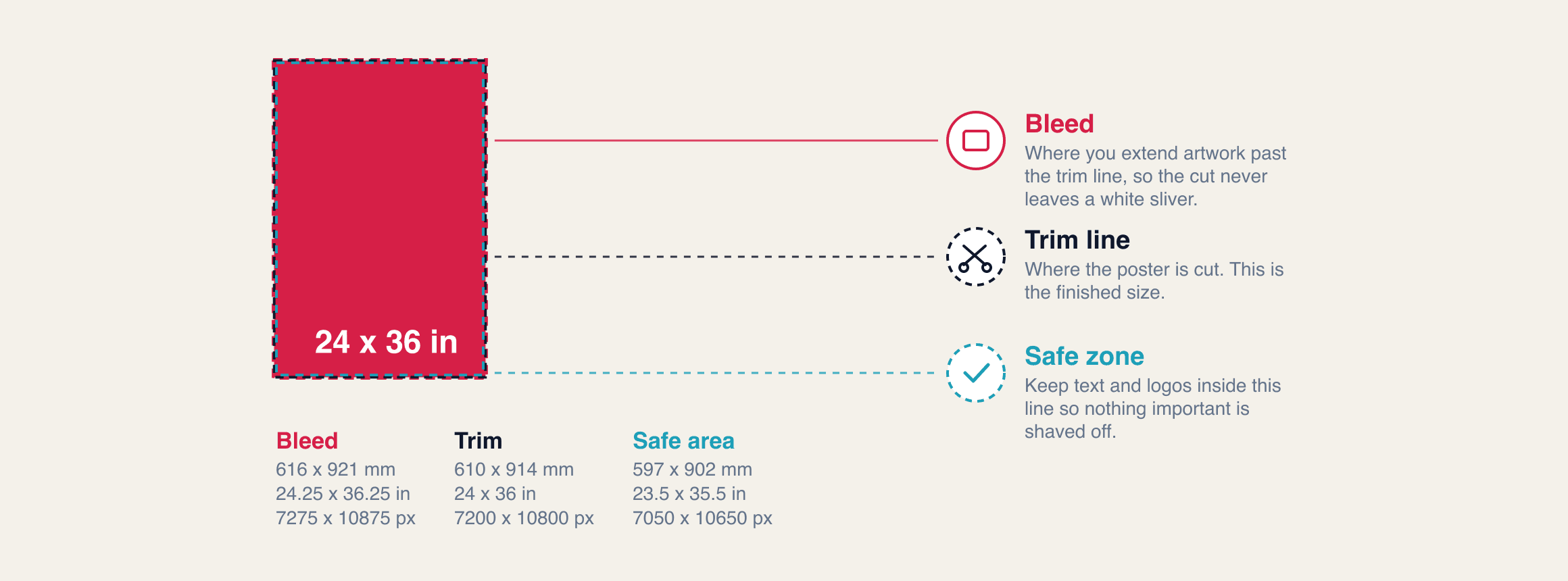
24 x 36
- Bleed
- 616 x 921 mm
- 24.25 x 36.25 in
- 7275 x 10875 px at 300 dpi
- Trim
- 610 x 914 mm
- 24 x 36 in
- 7200 x 10800 px at 300 dpi
- Safe area
- 597 x 902 mm
- 23.5 x 35.5 in
- 7050 x 10650 px at 300 dpi
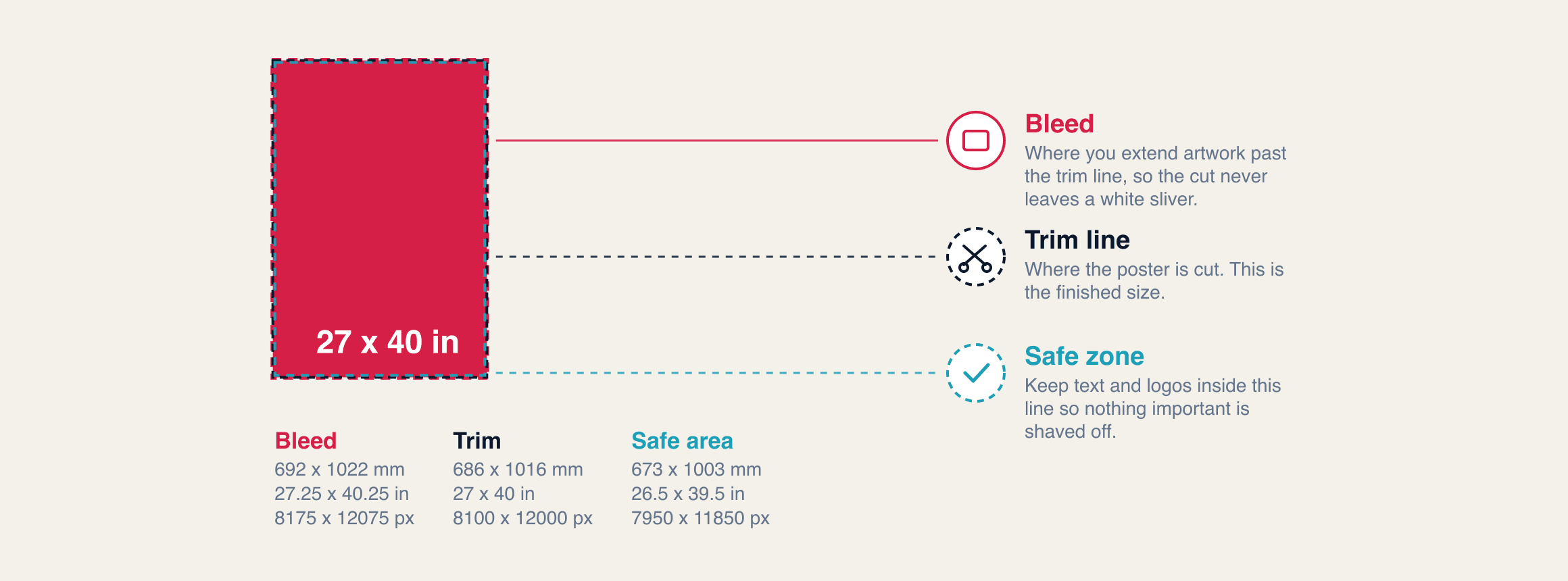
27 x 40
- Bleed
- 692 x 1022 mm
- 27.25 x 40.25 in
- 8175 x 12075 px at 300 dpi
- Trim
- 686 x 1016 mm
- 27 x 40 in
- 8100 x 12000 px at 300 dpi
- Safe area
- 673 x 1003 mm
- 26.5 x 39.5 in
- 7950 x 11850 px at 300 dpi
Card 1 / 4
Found a size you like? Get started now.
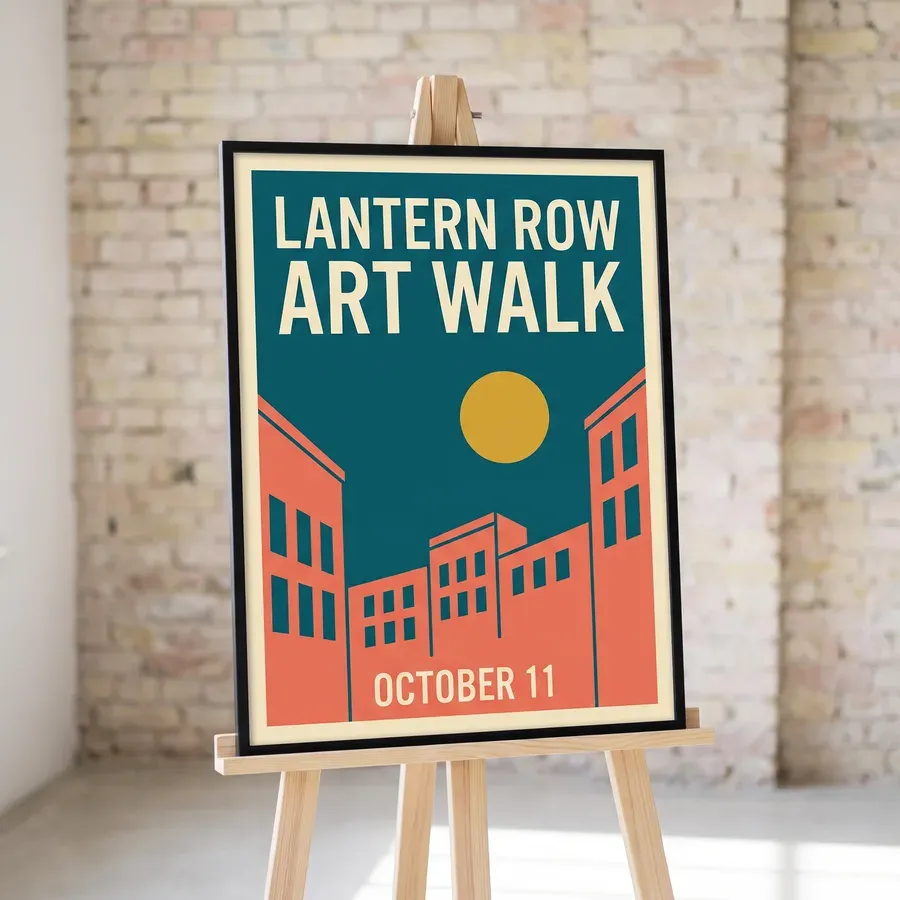
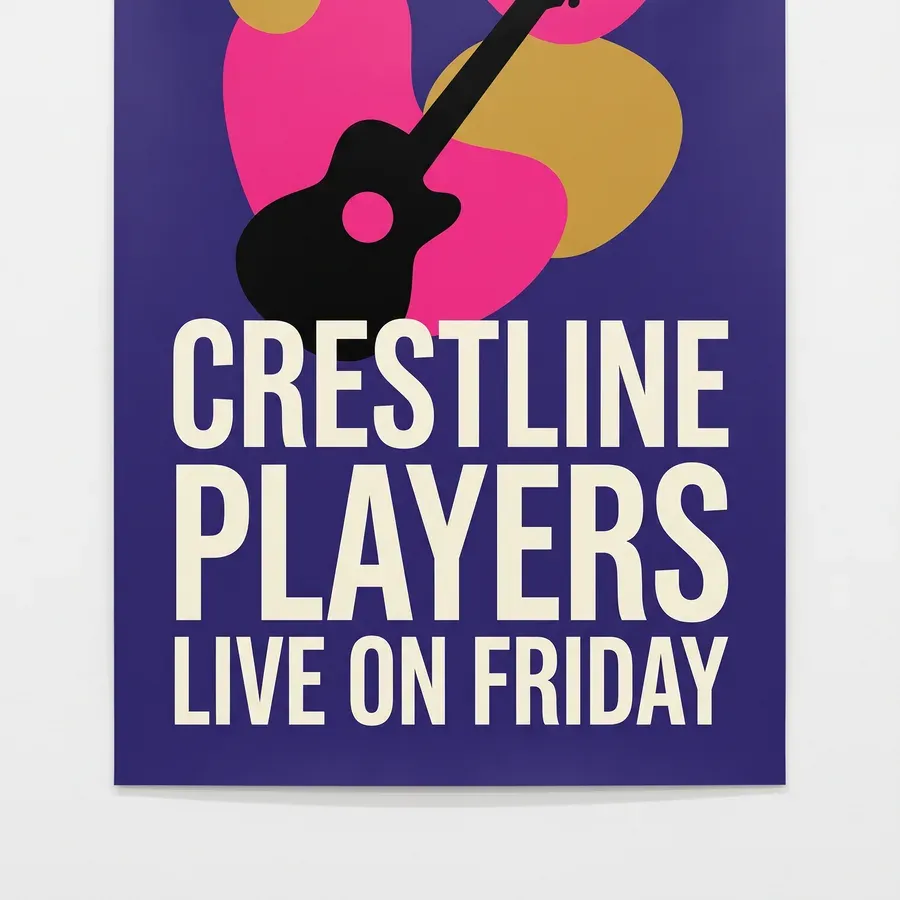
Frequently Asked Questions
18 x 24 inches is the most common poster size. It reads from across a room or a parking lot and still fits standard easels, snap frames and window spaces. Build the file at 18.25 x 24.25 inches so it carries bleed, and keep text inside 17.5 x 23.5 inches.
A 24 x 36 poster is 7200 x 10800 pixels at 300 dpi. With the 0.125 inch bleed added the canvas is 24.25 x 36.25 inches, or 7275 x 10875 pixels. At 150 dpi, which is normal for a poster this big, the same sheet is 3600 x 5400 pixels.
The theatrical one sheet is 27 x 40 inches, which is 686 x 1016 mm. Older one sheets ran 27 x 41 inches, and the promotional versions handed out at events are usually 11 x 17. Most snap frames and lobby cases in the United States are cut for 27 x 40.
A poster needs 0.125 inches of bleed on all four sides, which is 3 mm. That turns an 18 x 24 inch poster into an 18.25 x 24.25 inch file. Any background color or photo has to run all the way to the outer edge of that larger file, not stop at the poster.
Portrait for almost everything, because most wall and window space is taller than it is wide. Landscape earns its place above a doorway, behind a counter or in a display case. The numbers do not change: a 17 x 11 poster is an 11 x 17 rotated, same file, same price.
Yes, but export a PDF at the right document size rather than sending the native file. Set the canvas to the bleed size, 18.25 x 24.25 inches for an 18 x 24, and expect the bleed to need rebuilding if you did not. We rebuild it for you, and there is no setup fee for that.
Related Articles
Banner Sizes: 2x4, 3x6, 4x8, 6x10 Feet and Letter Height
Standard banner sizes are 2 x 4, 3 x 6, 4 x 8 and 6 x 10 feet. Get the letter height rule, hem [...]
Read More: Banner Sizes: 2x4, 3x6, 4x8, 6x10 Feet and Letter Height
Postcard Sizes: 4x6, 5x7, 6x9, Bleed and USPS Rules
Standard postcard sizes are 4 x 6, 5 x 7 and 6 x 9 inches, and only 4.25 x 6 or smaller mails [...]
Read More: Postcard Sizes: 4x6, 5x7, 6x9, Bleed and USPS Rules
Yard Sign Sizes: 12x18 to 36x24 in, Bleed and Stakes
Standard yard sign sizes are 12x18, 18x24, 24x24 and 36x24 inches. Get letter height by [...]
Read More: Yard Sign Sizes: 12x18 to 36x24 in, Bleed and Stakes
Standard Business Card Size: 3.5 x 2 in, Bleed and Pixels
The standard business card size is 3.5 x 2 in, 1050 x 600 pixels at 300 dpi. Bleed and safe [...]
Read More: Standard Business Card Size: 3.5 x 2 in, Bleed and Pixels